

The first question that comes to mind is: what do AI integration services include, what do they cost, and how do you choose a provider?
AI integration services connect AI models to the systems you already run, such as your CRM, helpdesk and database, so the AI can read your data and act inside your workflows.
Scope sets the price, run costs surprise most buyers, and the safest provider hands you a scoped plan, a written exit path and a named owner for security.
TL;DR
What they include: An audit, system connectors, AI logic, guardrails, testing, monitoring and handover.
What they cost: Price follows the number of systems, data readiness and compliance needs. Run costs come on top.
How long they take: Small workflows can ship in days. Multi-system builds take weeks.
How to choose: Score providers on scope clarity, IP ownership, security accountability, testing and exit terms.
Biggest risk: A pilot that works in a demo and stalls in production.
Can you list, from memory, every field an AI assistant needs from your CRM, helpdesk and billing tool to answer one customer ticket correctly?
Me neither. Here is why.
Most integrations fail at the seams between systems, not inside the model. My scoping rule is simple: list the systems everyone mentions, then ask which one they forgot.
That forgotten system is usually where the integration breaks.
Gartner predicted in July 2024 that at least 30% of generative AI projects would be abandoned after proof of concept by the end of 2025. It named poor data quality, weak risk controls, rising costs and unclear business value.
In my experience, all four show up at scoping, not after launch.
What Are AI Integration Services?
AI integration services, also called artificial intelligence integration services, embed AI into software you already use, instead of building a new AI product from scratch.
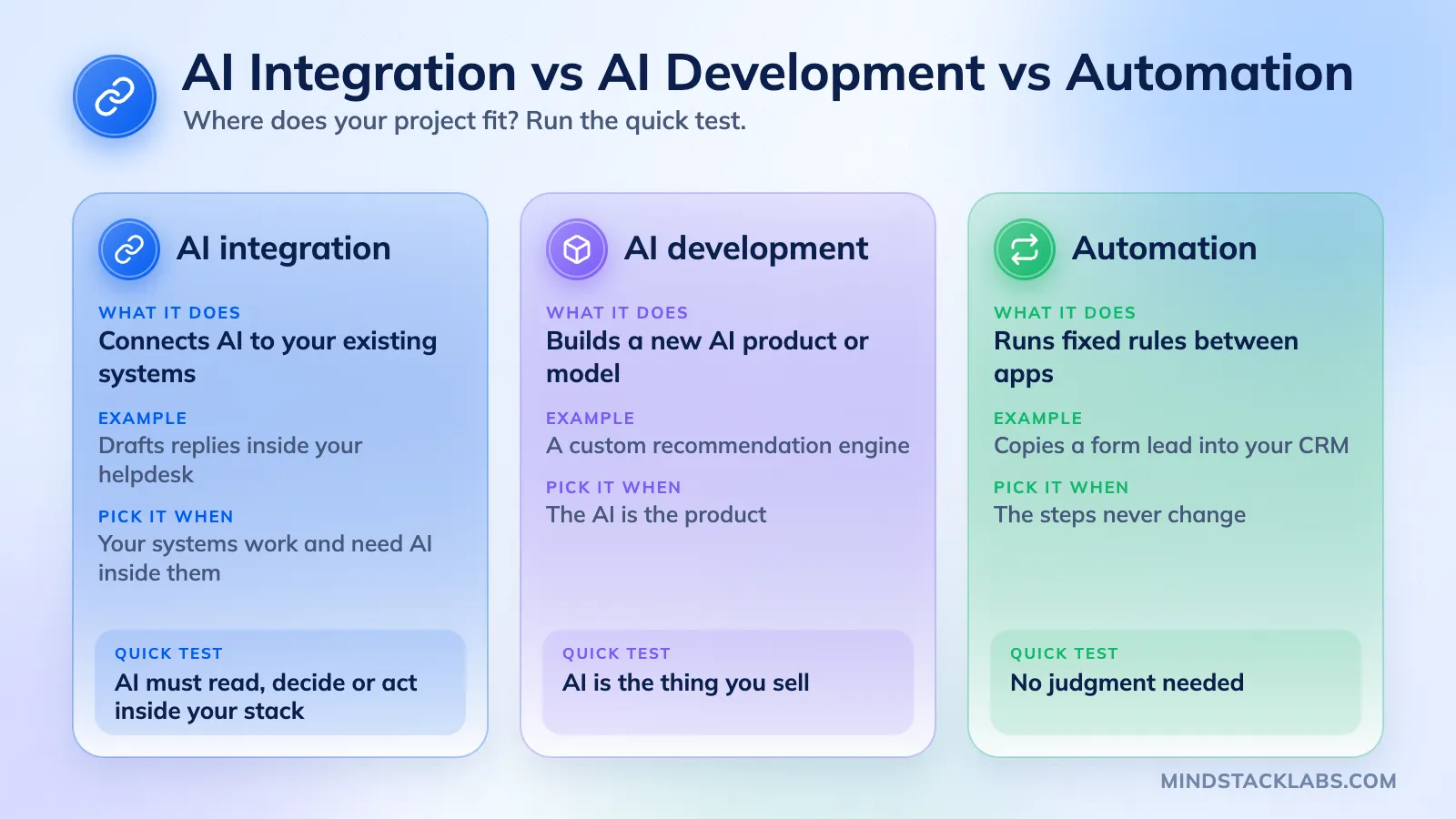
Use this table to place your project:
Approach | What it does | Example | Pick it when |
|---|---|---|---|
AI integration | Connects AI to your existing systems | Drafts replies inside your helpdesk | Your systems work and need AI inside them |
AI development | Builds a new AI product or model | A custom recommendation engine | The AI is the product |
Automation | Runs fixed rules between apps | Copies a form lead into your CRM | The steps never change |
Quick test:
AI must read, decide or act inside your stack = integration
AI is the thing you sell = development
No judgment needed = plain automation
Who needs AI integration services, and who should buy a SaaS tool instead?
Buy a SaaS tool if one vendor already covers your single use case. Hire an integration team when AI must touch several systems, follow your rules or use your private data.
A chatbot with no system access is a very polite brochure.
What Do AI Integration Services Include?
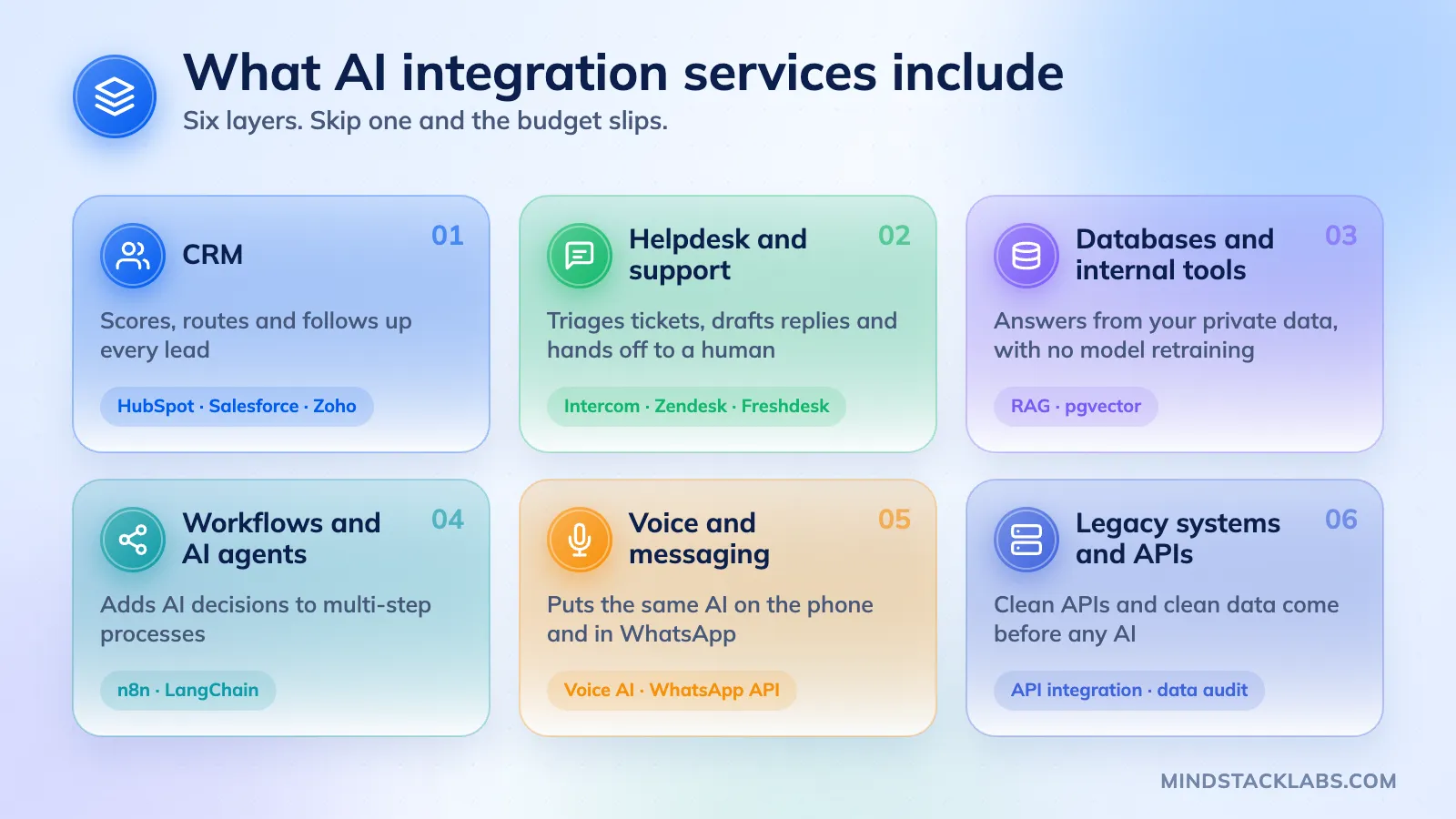
A complete engagement covers six layers, and skipping one is how budgets slip.
Connecting AI to your CRM
CRM integration turns raw leads into scored, routed and followed-up pipeline. Our AI CRM systems work covers HubSpot, Salesforce and Zoho, plus any CRM that has an API.
→ Form lead + enrichment + scoring = rep alert with context
Connecting AI to your helpdesk and support channels
Helpdesk integration lets AI triage tickets and answer routine questions, then hand off to a human. Our AI customer support systems work lists Intercom, Zendesk, Freshdesk and HubSpot.
→ Ticket arrives + order lookup + draft reply = human approves in one click
Building a chatbot first? Read our guide to AI chatbot development services.
Connecting AI to databases and internal tools
Database integration gives AI your private knowledge without retraining a model. This is usually retrieval, and our LangChain RAG pipelines and database solutions pages cover vector search with pgvector and other stores.
Not sure retrieval is the right pattern? Read RAG vs fine-tuning vs AI agents.
Workflow automation and AI agents
Workflow integration adds AI decisions to multi-step processes, such as classifying a request and routing it. We build these with AI workflow automation and n8n workflows.
Agents add tool use on top. Here is how they differ from chatbots: AI agents vs AI chatbots.
Voice and messaging channels
Channel integration puts the same AI on the phone and in WhatsApp. See voice AI solutions and WhatsApp automation, which uses the official WhatsApp Business API.
Legacy systems and API wiring
Legacy systems need clean APIs and clean data before AI touches them. A scoped API integration service or a data audit comes first.
System | Typical AI job | Integration method | Main risk |
|---|---|---|---|
CRM | Score and route leads | API and webhooks | Duplicate or stale records |
Helpdesk | Triage and draft replies | Native API | Wrong answers sent unreviewed |
Database | Answer from your documents | Retrieval (RAG) | Weak access controls |
Voice or WhatsApp | Handle first contact | Telephony or WhatsApp API | No clean human handoff |
How Does an AI Integration Project Work?
A sound project runs in four phases, and each phase ends with a decision gate.

Audit and use-case selection. Map the process, data and owners. Gate: can you name one measurable outcome?
Architecture and design. Define triggers, data flow, permissions and error paths. Gate: does every action have a human override?
Build, test and evaluate. Wire connectors, then test against real examples. Gate: does it pass your test set?
Deploy, monitor and hand over. Launch with alerts, documentation and training. Gate: does your team know who owns it?
How long does it take? Mind Stack Labs lists 3 to 7 days for simple workflows and 2 to 4 weeks for complex AI workflows. For CRM work, it lists 1 to 2 weeks for simple setups and 3 to 6 weeks for full overhauls.
Treat those as scoping starting points, not promises.
What Do AI Integration Services Cost?
Cost follows scope, not the model.
I am not quoting dollar ranges here. Any single range hides the variables below.
What drives the price
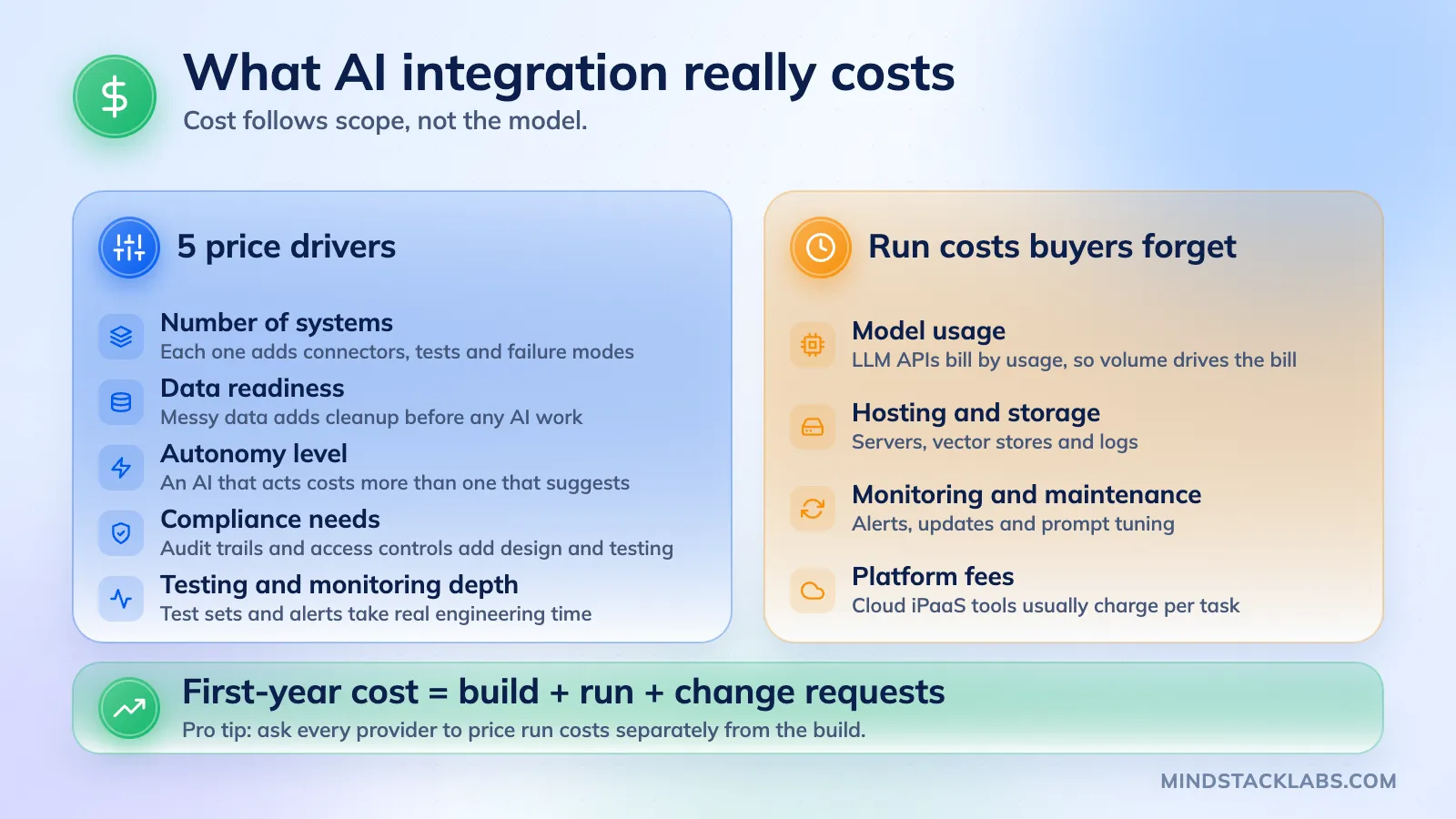
Five variables drive most of the price.
Example (illustrative, not a client result): a support-ticket integration that touches your helpdesk, order database and billing tool is three systems, not one.
Number of systems: Each system adds connectors, tests and failure modes.
Data readiness: Messy data adds cleanup before any AI work.
Autonomy level: An AI that suggests costs less than one that acts.
Compliance needs: Audit trails and access controls add design and testing.
Testing and monitoring depth: Test sets and alerts take real engineering time.
Pricing models: which fits when
Fixed scope suits stable requirements, and time and materials suits moving ones.
Model | Best when | Watch for |
|---|---|---|
Fixed scope | Requirements are stable | Change requests that reopen the quote |
Time and materials | Scope is still moving | No cap without a budget ceiling |
Retainer | You need ongoing tuning | Hours that buy no measurable outcome |
The run costs buyers forget
Run costs continue after launch, so budget for them on day one.
Model usage: LLM APIs bill by usage, so volume drives the monthly bill.
Hosting and storage: Servers, vector stores and logs.
Monitoring and maintenance: Alerts, updates and prompt tuning.
Platform fees: Cloud iPaaS tools usually charge per task. Mind Stack Labs' n8n page describes self-hosted setups with no per-execution fees, and our OpenAI API integration page lists prompt caching and model routing as cost controls.
→ First-year cost = build + run + change requests
Weighing self-hosting? Read self-hosting vs cloud in 2026.
Where budgets blow up
Four habits blow most budgets.
No named data owner, so questions stall for weeks.
"Just one more system" added mid-build.
No test set, so quality is argued, not measured.
Retries that quietly multiply model calls.
Pro tip: Ask every provider to price the run costs separately from the build.
How to judge whether it pays back
Measure payback against a baseline you record before launch.
Baseline: Time and cost per task today.
Quality: Accuracy on your test set.
Trust: How often humans override the AI.
Cost per task: Build and run costs together.
→ Time saved × task volume − run costs = net gain
What to prepare before you ask for quotes
Prepare five things first, and every quote you get becomes comparable.
A list of every system the AI must read from or write to.
One named owner for each data source.
One measurable outcome.
A sample of real tickets, leads or documents for testing.
A decision on what the AI may do alone and what needs approval.
The 6 Ways to Get AI Integration Done, Compared
Six routes exist, and the right one depends on how many systems you touch and how sensitive your data is.
What I am evaluating on
I compare every option on five plain criteria.
Time to first value: How fast something useful goes live.
Control and IP: Who owns the code, data and workflows.
Total cost over 12 months: Build plus run, not just the quote.
Fit with your systems: Depth of CRM, helpdesk and database wiring.
Security accountability: Who answers for data access and audits.
1. In-house engineering team
An in-house team gives you the most control and the slowest start.
Key capabilities: Deep domain knowledge, full ownership, flexible roadmap.
Pricing model: Salaries, hiring cost and tooling.
Best for: Companies where integration is core to the product and hiring is realistic.
2. No-code iPaaS (Zapier or Make)
No-code iPaaS is the fastest route for simple, low-risk flows.
Key capabilities: Prebuilt connectors, visual builders, quick setup.
Pricing model: Usage-based subscription, so cost grows with volume.
Best for: One or two apps, standard steps, little sensitive data.
3. Enterprise consultancy
An enterprise consultancy brings governance and scale, with longer timelines.
Key capabilities: Change management, compliance programs, large multi-team rollouts.
Pricing model: Project fees, typically at the high end of the market.
Best for: Large organizations with formal procurement and many stakeholders.
4. Platform vendor services (for example, your CRM vendor)
Vendor services work best when everything lives inside one platform.
Key capabilities: Native features, vendor-supported connectors.
Pricing model: License add-ons plus services fees.
Best for: Teams standardized on a single ecosystem who accept the lock-in.
5. Freelancer
A freelancer is the cheapest start and the biggest continuity risk.
Key capabilities: Low overhead, quick prototypes, flexible hours.
Pricing model: Hourly or fixed project fee.
Best for: Prototypes, if IP and handover documentation are written into the contract.
6. Specialist AI integration agency (Mind Stack Labs is one)
A specialist agency suits small and mid-sized teams that need several systems wired without hiring ML engineers.
Key capabilities: Mind Stack Labs' service pages list n8n workflows, OpenAI API and LangChain builds, plus CRM, helpdesk, voice and WhatsApp integrations.
Pricing model: No public pricing. It offers a free 30-minute discovery call and a proposal within 24 hours.
Best for: Multi-system builds where you want audit, build, documentation, training and 30-day post-launch support from one team.
Weigh this entry accordingly: this guide is published by Mind Stack Labs.
Wait, you might be thinking: "Can't I just use Zapier?"
Yes, for simple flows with low-risk data. Move to custom integration when logic branches, data is sensitive or volume makes per-task pricing painful. Read build vs buy for the wider trade-off.
If Your Priority Is X, Go With Y
Match your priority to a route, then confirm with the scorecard below.
If you need one simple automation this week, go with no-code iPaaS.
If AI must touch several systems and you lack ML engineers, go with a specialist agency.
If you need enterprise-wide governance, go with an enterprise consultancy.
If integration is your product, go in-house.
If you are prototyping on a tight budget, go with a freelancer and a written handover.
What Risks Should You Plan For in AI Integration?
Plan for three risks: data exposure, compliance gaps and pilots that stall.
Security
Security starts with least privilege, so give the AI only the access its job needs.
Example (illustrative, not a client result): an AI that drafts refund replies should not be able to issue refunds. Add an approval step.
Prompt injection and excessive agency both appear in the OWASP Top 10 for LLM Applications (2025 version).
Lock down APIs first: use our API security checklist.
Treat user data as a design input: see how modern applications protect user data.
Compliance
Compliance is an engineering practice, not a badge, and nothing in this guide claims a certification for Mind Stack Labs.
For patient data, the HHS summary of the HIPAA Security Rule names technical safeguards: access control, audit controls, integrity controls and transmission security.
On projects that touch patient data, we build to those technical safeguards. See HIPAA compliant app development and our healthcare industry page.
For governance, NIST published its Generative AI Profile (NIST AI 600-1) in July 2024.
Stalled pilots: when to stop or roll back
Set stop rules before launch, not after the first incident.
Accuracy drops below your test-set threshold.
Humans override the AI more often than you planned.
Cost per task exceeds the business case.
Any unexplained data access appears in logs.
Pro tip: Write your stop rules into the statement of work.
How Do You Choose an AI Integration Provider?
Choose the provider that scores best on scope clarity, ownership and security, not the one with the best demo.
An 8-point scorecard
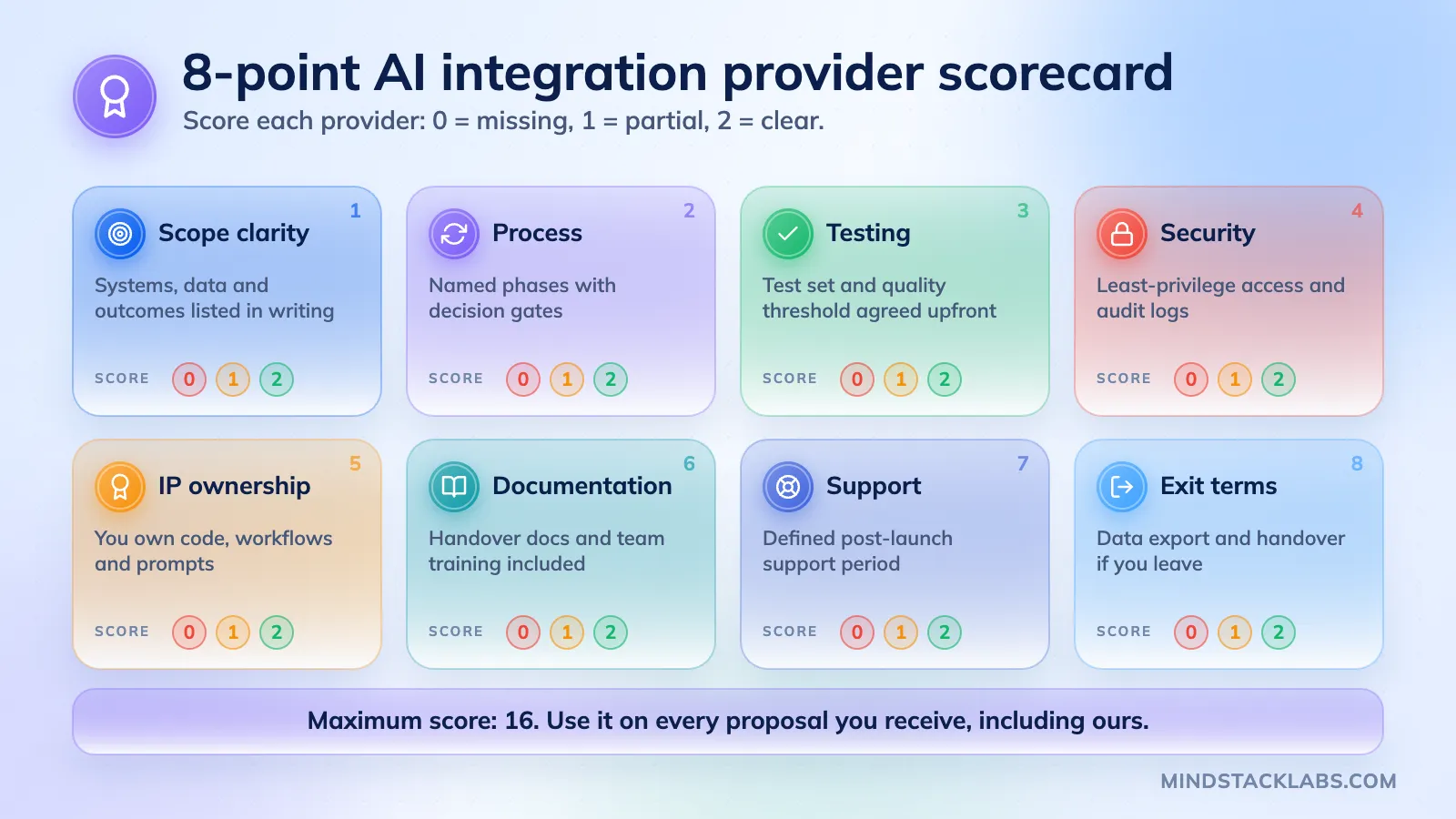
Eight criteria separate clear proposals from vague ones. Score each provider 0 (missing), 1 (partial) or 2 (clear):
Criterion | What good looks like |
|---|---|
Scope clarity | Systems, data and outcomes listed in writing |
Process | Named phases with decision gates |
Testing | Test set and quality threshold agreed upfront |
Security | Least-privilege access and audit logs |
IP ownership | You own code, workflows and prompts |
Documentation | Handover docs and team training included |
Support | Defined post-launch support period |
Exit terms | Data export and handover if you leave |
Contract terms to insist on
Four contract terms protect you most.
IP ownership and an NDA.
Where your data is stored and who can access it.
Support period and response times.
Handover documents and training.
Red flags
Four red flags predict trouble early.
A demo with no discussion of your data.
No mention of run costs.
"Works with everything" and no list.
No named project owner.
Local or remote: does location matter?
Location matters less than overlap hours and clear ownership. Compare time zones and handover norms, and read our outsourcing risk checklist.
MCP and AI Agents: Where Does the Integration Layer Go Next?
Integration is moving toward standard connectors, so ask providers how they handle them.
Anthropic introduced the Model Context Protocol (MCP) in November 2024 as an open standard for connecting AI to tools and data. Our explainer, MCP and the protocol powering AI agents, covers the basics.
Ask each provider one question: do you build on open standards, or on custom connectors you cannot reuse?
How Does Mind Stack Labs Approach AI Integration?
We run every engagement through four phases: audit, design, build and test, then launch and monitor.
Stack: n8n, OpenAI API, LangChain, REST APIs, Supabase and Firebase, as listed on our services pages.
Terms: NDA, full IP ownership, a dedicated project manager and 30 days of post-launch support.
Related builds: QuickAssist (WhatsApp service booking), Carebot AI (medical appointment assistant) and Ava (real-time voice AI). Browse more in our case studies.
AI Integration Services FAQs
How much do AI integration services cost?
Cost depends on the number of systems, data readiness, autonomy and compliance needs. Ask for build and run costs priced separately. See the full breakdown above.
How long does AI integration take?
Simple workflows can take days, and multi-system builds take weeks. Mind Stack Labs lists 3 to 7 days for simple workflows and 2 to 4 weeks for complex AI workflows.
What is the difference between AI integration and AI development?
Integration adds AI to systems you already run. Development builds a new AI product or model from scratch.
Custom AI integration vs Zapier: which is better?
Zapier suits simple, low-risk flows. Custom integration wins when logic branches, data is sensitive or per-task pricing grows with volume.
Can a small business afford AI integration services?
Yes, if you start with one system and one measurable outcome. Scope a small pilot first, then expand once it pays back. More answers are in our FAQ.
Next Steps: Start Small, Scope in Writing
Start with a one-system pilot scoped in writing, and use a specialist agency if it touches more than one system or sensitive data.
Use the scorecard on every proposal you receive, including ours.
Want a second pair of eyes on your scope? Book a free 30-minute discovery call with Mind Stack Labs and bring your systems list.