Introduction
Artificial Intelligence has fundamentally changed software development. Whether you're using GitHub Copilot, ChatGPT, Claude Code, Gemini Code Assist, or Cursor, AI can generate complete functions, REST APIs, Flutter widgets, SQL queries, and even entire applications within seconds.
But there's a catch.
AI doesn't truly understand your project.
It predicts code based on learned patterns, meaning the generated code often looks correct while hiding subtle bugs that only surface during execution. It may introduce unnecessary complexity, outdated APIs, performance bottlenecks, security vulnerabilities, or logic that doesn't fit your application's architecture.
Many developers discover that debugging AI-generated code sometimes takes longer than writing the feature themselves.
The good news is that it doesn't have to.
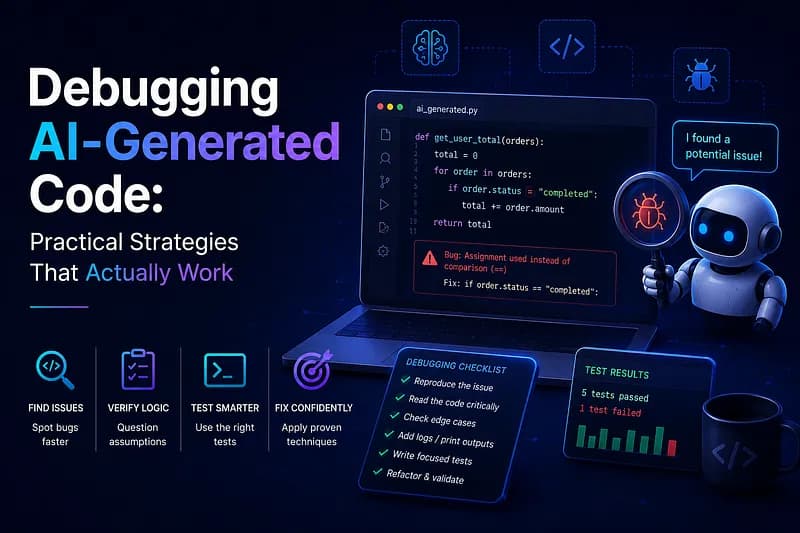
This guide covers practical debugging strategies that consistently reduce debugging time and help you use AI as a productive engineering partner instead of a source of mysterious bugs.
Why AI-Generated Code Fails
AI rarely makes random mistakes. Most failures occur because it lacks project-specific context.
AI doesn't know:
- Your application architecture
- Business rules
- Existing utility classes
- Performance requirements
- Security constraints
- Previously solved edge cases
As a result, AI frequently produces code that is syntactically correct but logically incorrect.
Common issues include:
- Deprecated APIs
- Incorrect package versions
- Missing null checks
- Race conditions
- Duplicate business logic
- Improper asynchronous handling
- Production-only failures
Never Assume the AI Is Correct
Treat AI like a junior software engineer.
You wouldn't merge a junior developer's pull request without reviewing it first, and AI-generated code deserves the same level of scrutiny.
Before running the application, ask yourself:
- What problem is this code solving?
- Does it follow our architecture?
- Does similar functionality already exist?
- Is there a simpler implementation?
- What assumptions is this code making?
Reviewing code before execution often reveals obvious mistakes immediately.
Debug Small Components Instead of Entire Features
One of the biggest mistakes developers make is generating hundreds of lines of code at once.
Instead, validate features incrementally:
- Create the data model.
- Verify serialization.
- Build the API layer.
- Test the service.
- Implement state management.
- Verify business logic.
- Build the UI.
Smaller iterations make debugging significantly easier because each change is isolated.
Verify Every External Dependency
AI often recommends packages that are deprecated, abandoned, renamed, incompatible, or unnecessary.
Before adding any dependency, verify:
- Maintenance status
- Latest version
- Popularity
- Official documentation
- Framework compatibility
Many issues originate from outdated dependencies rather than the generated implementation.
Use Structured Logging Before the Debugger
Instead of immediately setting breakpoints, start with structured logging.
Log important information such as:
- Input parameters
- API responses
- Application state
- Exceptions
- Lifecycle events
- Navigation flow
debugPrint('User ID: $userId');
debugPrint('Response: ${response.body}');
debugPrint('Current State: $state');
Well-placed logs often reveal exactly where execution diverges from expectations.
Validate with Real-World Data
AI typically generates examples using ideal inputs.
Production users rarely behave that way.
Always test:
- Null values
- Empty strings
- Large payloads
- Slow network connections
- Offline mode
- Duplicate requests
- Unexpected server responses
Edge cases expose assumptions that AI frequently overlooks.
Read the Entire Error Message
Many developers copy only the first line of an exception into ChatGPT.
Instead, examine the complete stack trace.
Focus on:
- Exception type
- File name
- Line number
- Nested exceptions
- Root cause
Often the solution is already contained within the error message itself.
Compare Against Existing Working Code
When AI generates new functionality, compare it with a similar feature already working in your application.
Review:
- Dependency injection
- Repository pattern
- Error handling
- State management
- Caching strategy
- Naming conventions
Differences frequently expose the underlying bug.
Ask AI to Explain Instead of Rewrite
Instead of repeatedly asking AI to fix the bug, ask it to explain the generated implementation.
Useful prompts include:
- Explain this function line by line.
- Why is this variable nullable?
- Why isn't this Future awaited?
- Why does this widget rebuild repeatedly?
- What assumptions does this code make?
Understanding the implementation usually leads to better debugging decisions than requesting endless rewrites.
Use Git as a Debugging Tool
Never paste massive AI-generated changes directly into your primary branch.
Create small commits such as:
- API integration
- Authentication
- Pagination
- Error handling
- UI implementation
Small commits make it easy to identify exactly when bugs were introduced.
Profile Performance, Not Just Correctness
AI often generates code that functions correctly but performs poorly.
Common performance issues include:
- Repeated API calls
- Memory leaks
- Nested loops
- Large widget rebuilds
- Expensive database queries
Use tools such as Flutter DevTools, Android Studio Profiler, Chrome DevTools, and Xcode Instruments to validate runtime performance.
Watch for Hallucinated APIs
AI occasionally invents APIs that appear legitimate.
For example:
controller.refreshData();when the method doesn't actually exist.
Or:
FirebaseAuth.instance.logout();instead of:
FirebaseAuth.instance.signOut();Always verify unfamiliar APIs using official documentation.
Never Blindly Trust Security Code
Security-sensitive implementations deserve additional review.
AI may accidentally:
- Expose API keys
- Skip authorization checks
- Ignore input validation
- Store credentials insecurely
- Trust client-side data
Always review authentication, authorization, encryption, token management, and network communication carefully.
Create a Minimal Reproduction
If a bug appears inconsistently, simplify the project until only the failing code remains.
Temporarily remove:
- Animations
- Background services
- Unrelated widgets
- Third-party integrations
A smaller reproduction makes identifying the root cause significantly easier.
Provide Better Context to AI
Instead of asking:
My app doesn't work.
Provide:
- Complete error message
- Relevant source code
- Expected behavior
- Actual behavior
- Framework versions
- Platform information
- Reproduction steps
Better context consistently produces better debugging assistance.
A Practical Debugging Workflow
- Read generated code before running it.
- Verify APIs and dependencies.
- Implement one component at a time.
- Add structured logging.
- Reproduce the issue consistently.
- Read the full stack trace.
- Compare with existing working code.
- Use Git to isolate changes.
- Profile performance.
- Ask AI to explain the implementation instead of rewriting everything.
Following this workflow dramatically reduces debugging time in AI-assisted development.
Best Practices
- Treat AI as a collaborator, not an authority.
- Review every generated change before committing.
- Generate code incrementally.
- Keep dependencies updated.
- Write automated tests.
- Validate performance and security.
- Maintain a clean Git history.
Conclusion
AI has become an indispensable tool for modern software engineering, enabling developers to build features faster than ever before.
However, successful engineering isn't about generating code—it's about understanding, validating, testing, and debugging that code effectively.
The best developers combine AI's speed with systematic debugging techniques, strong engineering fundamentals, and critical thinking to deliver software that is reliable, secure, performant, and production-ready.
Ultimately, the developers who succeed in the AI era won't be those who generate the most code—they'll be the ones who know how to debug it with confidence.