Introduction
Three years ago, choosing a code editor was simple: you downloaded VS Code, installed your favorite syntax theme, added a few extensions, and got to work.
Today, developer tooling has undergone a seismic shift. AI isn't just an extension sitting in a sidebar; it's driving entire workflows, editing dozens of files simultaneously, and executing complex engineering tasks.
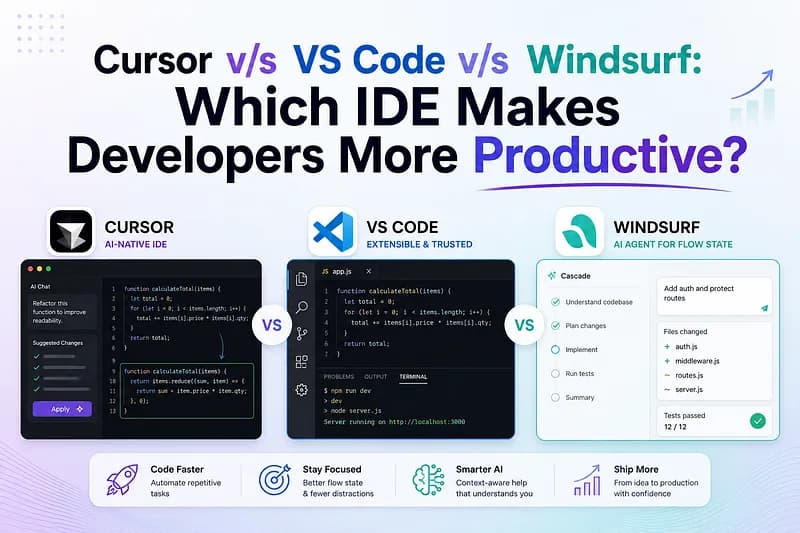
Enter the primary contenders dominating the developer landscape:
- VS Code (+ GitHub Copilot): The battle-tested industry titan with unmatched ecosystem depth.
- Cursor: The pioneer of the AI-native fork, built specifically for flow state and multi-file orchestration.
- Windsurf: Codeium's AI-first editor featuring autonomous flow state agents and deep context tracking.
If you're trying to figure out which editor will give you or your engineering team the highest return on productivity, here is a practical, data-informed breakdown.
The Architectural Divide: Plugins vs. AI-Native Forks
Before comparing feature lists, it helps to understand the underlying architecture.
VS Code remains an extension-first model. The core editor is unchanged, while GitHub Copilot operates alongside it as an assistant.
Cursor and Windsurf are VS Code forks. Their creators modified the editor at an architectural level to give the AI direct access to your local workspace, terminal, file system, and git context.
This distinction dictates how each editor feels during complex coding sessions.
1. Inline Autocomplete & Flow State
When writing code line by line, friction is the enemy of productivity.
Cursor
Famous for ultra-fast multi-line predictions that anticipate both your next token and your next editing location, helping maintain continuous flow.
Windsurf
Features Supercomplete inline suggestions with deep context memory, tracking recent edits across multiple files to predict developer intent.
VS Code (+ GitHub Copilot)
Provides highly reliable inline completions and function generation but generally requires more explicit prompting for broader contextual edits.
Winner: Cursor.
2. Multi-File Editing & Agentic Workflows
Cursor (Composer)
Composer enables AI-driven planning and execution across multiple files while allowing developers to review each change before accepting it.
Windsurf (Cascade)
Cascade supports long-running autonomous workflows, including executing terminal commands, reading logs, fixing errors, and progressing through staged tasks with optional human intervention.
VS Code (+ Copilot Workspace)
Supports multi-file editing and AI-assisted terminal commands but follows a more conservative workflow than AI-native competitors.
Winner: Windsurf for autonomous workflows; Cursor for controlled multi-file refactoring.
3. Context Awareness & Codebase Indexing
VS Code
- Workspace-aware context
- Open file prioritization
- High repository context via Copilot Chat
Cursor
- Repository vector indexing
- @codebase, @docs, @file, @folder and @git references
- Large context window with retrieval augmentation
Windsurf
- Continuous background indexing
- Automatic Memories system
- Strong large-project awareness
4. Stability, Debugging & Ecosystem
VS Code
Offers unmatched stability with mature debugging tools, Dev Containers, Remote SSH, and an extensive extension marketplace.
Cursor & Windsurf
Both inherit most VS Code extensions but occasionally trail upstream releases and may experience minor compatibility issues with advanced extensions.
Winner: VS Code.
Quick Comparison Summary
Each editor targets a different style of development. Cursor emphasizes speed and flow, Windsurf prioritizes autonomous AI execution, and VS Code focuses on stability and ecosystem maturity.
The Verdict: Which Tool Should You Pick?
Choose Cursor if:
- You want the fastest AI-assisted coding experience.
- You frequently refactor multiple files.
- You like granular context control.
Choose Windsurf if:
- You prefer autonomous AI agents.
- You want AI to execute workflows with minimal supervision.
- You regularly build large features from prompts.
Choose VS Code (+ GitHub Copilot) if:
- You prioritize reliability and ecosystem maturity.
- You depend on Dev Containers, Remote SSH, or enterprise tooling.
- You need maximum compatibility with extensions.
Conclusion
The competition between Cursor, VS Code, and Windsurf isn't about replacing developers—it's about reducing friction. Cursor currently offers one of the smoothest AI-assisted coding experiences, Windsurf pushes autonomous development further with AI agents, while VS Code remains the most dependable editor for professional teams. The right choice depends on whether your priority is speed, autonomy, or long-term stability.